The MCP Gateway: Making Agents Accessible Anywhere
Building a gateway to expose homelab AI agents to Claude.ai and Claude Desktop, and the outputSchema debugging saga that almost broke everything.
Part 9 of the series: Building The Hub
My agents had a reach problem. Nightcrawler, Gideon, JARVIS, and SAGE were running on a homelab container, accessible via Claude Code on the local network. That worked great when I was sitting at my desk. But the moment I opened Claude.ai on my phone during a commute, or fired up Claude Desktop on a different machine, my agents might as well not exist. All that context, all those tools, all those capabilities — locked behind a LAN.
I needed a gateway.
The architecture
The idea was straightforward: a single public endpoint that proxies requests to multiple MCP servers running on the homelab. Each agent already exposed its own MCP server as a stdio process. I needed something in front of them that could accept incoming connections over HTTP and route them to the right backend.
I spun up a dedicated container — codename Vector — and built the MCP Gateway as a Node.js service using Streamable HTTP transport. The gateway manages a registry of MCP servers, each defined in a config file. When a request comes in for a specific server, the gateway spawns (or reuses) the corresponding stdio process and bridges the HTTP connection to it.
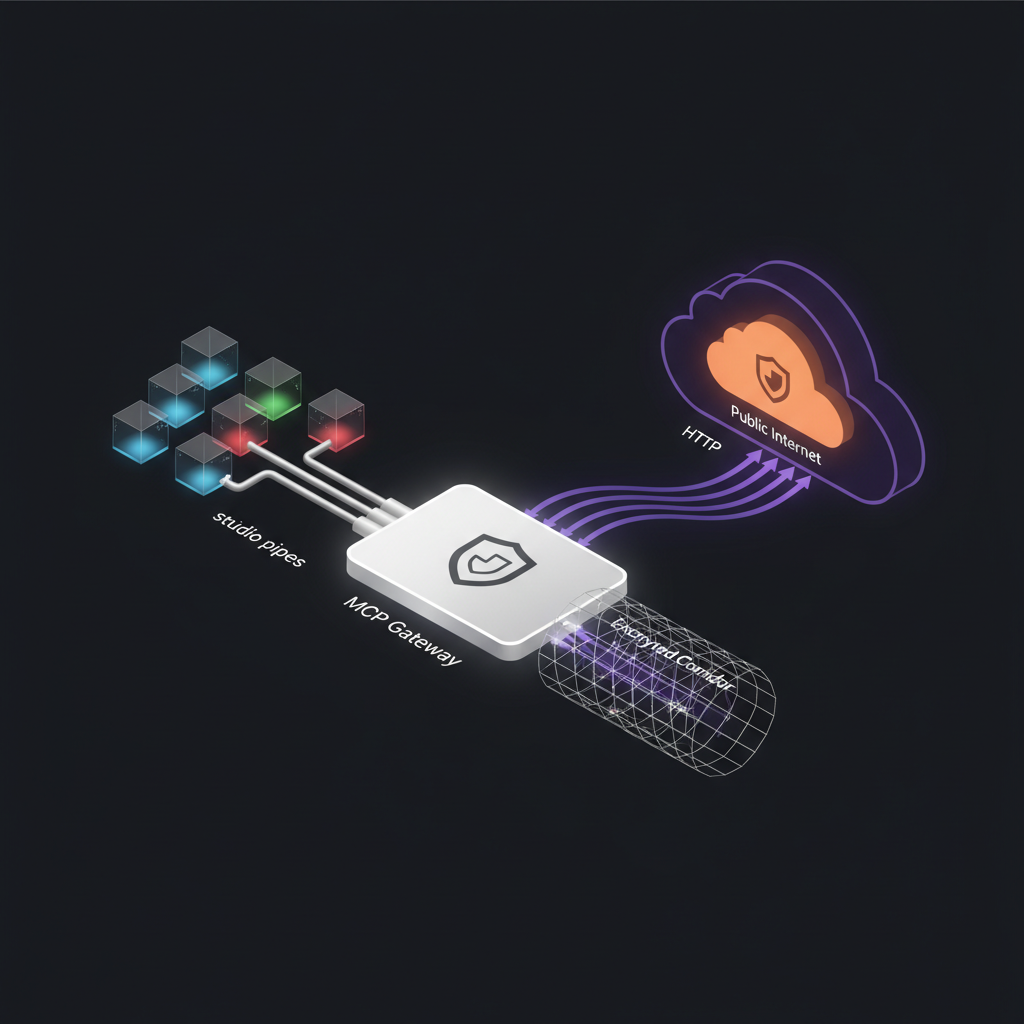
The important design choice was stateful sessions. Each client connection gets a session with a unique ID, and the gateway maintains that session’s state — including the spawned stdio process — with a TTL. Sessions that go stale get cleaned up automatically. If a client reconnects after the session expired, the gateway returns a 404 per the MCP specification, and the client initiates a fresh session.
To keep connections alive through Cloudflare’s timeout window, the gateway sends SSE keepalive pings at regular intervals. Without these, Cloudflare would terminate idle connections and the client would silently lose its session.
Going public with Cloudflare Tunnel
Port forwarding was never an option. I don’t want to punch holes in my network for a side project. Instead, I set up a Cloudflare Tunnel — a reverse tunnel from the container to Cloudflare’s edge network. The gateway gets a public URL without any inbound firewall rules.
There was one hiccup: the container is headless. Running cloudflared login opens a browser for OAuth authentication, which doesn’t work when there’s no display. The workaround was simple but not obvious: run cloudflared login on my Mac, complete the OAuth flow in the browser, then copy the resulting cert.pem to the container. After that, the tunnel agent runs headlessly without issues.
With the tunnel up, I had a public URL pointing at my homelab MCP Gateway. Now I needed to connect it to Claude.ai.
The OAuth rabbit hole
Claude.ai’s MCP connector integration supports authenticated MCP servers via OAuth. My first instinct was to implement it properly — full RFC 8414 discovery, RFC 9728 metadata, RFC 7591 dynamic client registration. I spent an evening building the OAuth server, setting up the authorization endpoint, the token endpoint, the metadata discovery.
Claude.ai rejected it.
The connector couldn’t complete the OAuth flow. The error messages were unhelpful. After debugging for longer than I’d like to admit, I stepped back and reconsidered. The gateway was already behind a Cloudflare Tunnel, which meant the URL was unguessable and traffic was encrypted end-to-end. Did I really need OAuth on top of that?
I didn’t. I configured the connector with a direct URL, no auth layer, and relied on the tunnel’s obscurity and Cloudflare’s transport security. Not enterprise-grade, but for a personal homelab with a single user, it’s the right trade-off. If I ever need to share access, I can revisit the auth layer.
The outputSchema debugging saga
This is where the story gets good — or painful, depending on your perspective.
I had multiple MCP servers registered in the gateway. The NPO server (for TV schedule data) worked perfectly. MIRS (my contacts database) did not. I’d add it to the gateway config, connect from Claude.ai, and… the tools simply didn’t appear. No error message. No warning. The server connected successfully, the handshake completed, but when I looked at the available tools in Claude.ai, the MIRS tools were missing.
Silent failure is the worst kind of failure.
My debugging approach was to diff the tools/list responses between the working server and the broken one. Both returned valid JSON. Both had properly structured tool definitions. The difference was in a field I’d barely thought about: outputSchema.
The MCP specification says outputSchema is optional. You only need it if your tool returns structuredContent. Both of my servers included outputSchema on their tools, but the NPO server’s schemas happened to be valid, while MIRS had two issues:
First, some tools had an empty outputSchema: {} — a JSON object with no type field. This is technically invalid JSON Schema. A schema needs at minimum a type property to be meaningful.
Second, other tools used oneOf with { type: 'null' } as one of the options. This looks reasonable if you’re coming from OpenAPI, where nullable types are expressed this way. But Claude.ai’s schema validator apparently doesn’t accept it.
The fix was almost anticlimactic: I removed all outputSchema declarations from every tool that wasn’t returning structuredContent. Since none of my tools used structured content, that meant removing it everywhere. Redeploy, reconnect, and suddenly all tools appeared.
There was a bonus gotcha hiding in the schemas too. Some had nullable: true on properties, which is an OpenAPI-ism that doesn’t exist in JSON Schema. In JSON Schema, you express nullable with type: ['string', 'null'] or a oneOf. Using OpenAPI conventions in an MCP tool schema is a silent error — nothing tells you it’s wrong, things just don’t work.
This cost me hours. The takeaway is clear: if your MCP tools aren’t appearing in Claude.ai, diff your tools/list output against a working server and scrutinize the schemas. The MCP spec is lenient, but Claude.ai’s tool registration is strict about JSON Schema validity. And it will not tell you when it rejects a tool.
What the gateway enables
With the gateway running, all four agents and their MCP servers are accessible from anywhere. I can open Claude.ai on my phone and query Nightcrawler’s capture system, ask Gideon for a project overview, have JARVIS analyze a codebase, or check the TV schedule through the NPO server. The same tools that were local-only are now available in every Claude client that supports MCP connectors.
The gateway also solved the multi-server problem elegantly. Instead of configuring a separate connector for each MCP server in Claude.ai, I configure one connector pointing at the gateway, and the gateway handles routing. Adding a new server is a config change and a restart, not a new connector setup.
If you’re building MCP servers for Claude.ai integration, here’s my shortlist of things I wish I’d known:
- Skip
outputSchemaunless you’re returningstructuredContent. It’s optional and getting it wrong causes silent tool registration failures. - Validate your schemas against JSON Schema, not OpenAPI. They look similar but have incompatible conventions.
- Use SSE keepalives if you’re behind any kind of proxy or CDN with idle timeouts.
- Handle stale sessions gracefully — return 404 and let the client reconnect.
- Cloudflare Tunnel is the easiest way to expose a homelab service publicly without touching your firewall.
The MCP Gateway turned my homelab agent ecosystem from a local experiment into something I use every day, from anywhere. That’s the kind of infrastructure investment that pays for itself immediately.